Best Office Productivity Tools and Features from WPS Office for Seamless Work
In today’s fast-paced digital world, having the right office software is essential for productivity, whether you’re a student, a professional, or a business owner. The challenge? Finding a powerful yet affordable office suite that offers seamless compatibility, cloud-based functionality, and intuitive tools.
That’s where WPS Office comes in. As a lightweight yet feature-packed office suite, WPS Office provides Writer, Presentation, Spreadsheets, and a PDF editor—all designed to make your workflow efficient, smooth, and hassle-free. With cross-platform support, AI-powered features, and full compatibility with Microsoft Office, WPS Office is a powerful alternative to traditional office software.
To help you make the most of your productivity, we’ve rounded up the best tools and services offered by WPS Office.
A Quick Overview:
- Best All-in-One Office Suite – WPS Office Suite
- Best Alternative to Microsoft Word – WPS Writer
- Best Alternative to Microsoft Excel – WPS Spreadsheets
- Best Alternative to Microsoft PowerPoint – WPS Presentation
- Best Built-in PDF Tool – WPS PDF Editor
- Best Cloud-Based Collaboration Tool – WPS Cloud
How to Choose the Right Office Productivity Software

Selecting the right office suite depends on your work style, file compatibility needs, and required features. Do you need a lightweight solution for document creation, a powerful spreadsheet tool for data analysis, or a seamless cloud-based platform for collaboration? With WPS Office, you get all of these in one integrated suite.
File compatibility and accessibility play a huge role when choosing an office suite. WPS Office supports Microsoft Word, Excel, and PowerPoint formats, making it easy to work on documents without compatibility issues. Additionally, the built-in PDF tools allow users to edit, convert, and sign PDFs without needing third-party software.
Finally, consider cloud integration and cross-device accessibility. With WPS Cloud, you can store, access, and edit documents from anywhere, whether you’re on a desktop, tablet, or smartphone. This ensures productivity on the go, without missing a beat.
Best Office Productivity Tools from WPS Office
WPS Office offers a powerful, all-in-one office suite that includes Writer, Spreadsheets, Presentation, and PDF editing tools, making it a versatile alternative to Microsoft Office. With AI-powered features, cloud integration, and cross-platform compatibility, WPS Office helps boost productivity for students, professionals, and businesses alike.
WPS Office Suite
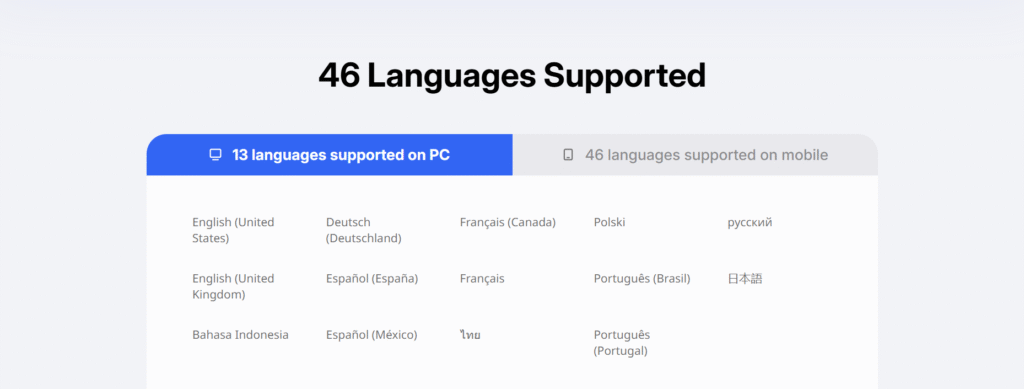
The WPS Office Suite is an all-in-one productivity solution that combines word processing, presentations, spreadsheets, and PDF editing in a single, lightweight package.
Pros:
- Fully compatible with Microsoft Office formats (Word, Excel, PowerPoint)
- Includes a built-in PDF editor for seamless document management
- Works across Windows, macOS, Linux, Android, and iOS
Cons:
- Advanced features require a premium subscription
The Bottom Line:
A versatile, feature-rich office suite that offers everything you need for work, school, or business in a compact package.
WPS Writer
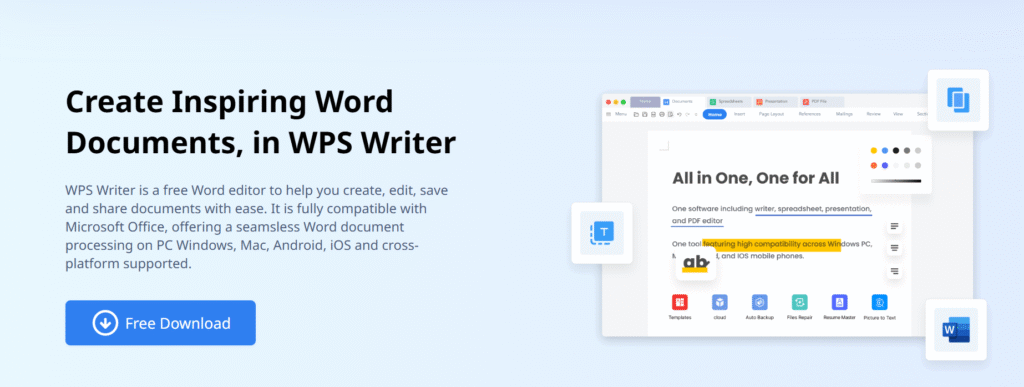
For writers, professionals, and students, WPS Writer delivers a powerful yet lightweight word processing experience, offering rich formatting, templates, and AI-powered tools.
Pros:
- Full support for DOC, DOCX, TXT, and RTF files
- Built-in AI features for grammar checking and formatting suggestions
- Easy-to-use interface with customizable templates
Cons:
- Some advanced editing features require a premium upgrade
The Bottom Line:
A perfect alternative to Microsoft Word, offering all the essential tools for creating, editing, and formatting documents with ease.
WPS Spreadsheets

For those who work with data, budgets, or business reports, WPS Spreadsheets offers powerful tools for calculations, data analysis, and automation.
Pros:
- Full compatibility with Excel (.XLS, .XLSX, .CSV)
- Built-in formulas and AI-powered data analysis
- Lightweight software that runs smoothly even on older devices
Cons:
- Doesn’t support all Excel macros and advanced pivot tables
The Bottom Line:
A robust and easy-to-use spreadsheet tool that’s perfect for students, professionals, and business users alike.
WPS Presentation

If you need to create stunning presentations, WPS Presentation offers an intuitive interface, creative templates, and animation tools.
Pros:
- Compatible with PowerPoint formats (PPT, PPTX, PDF)
- Dozens of free professional templates
- Supports animations, transitions, and multimedia elements
Cons:
- Limited stock image and video library compared to PowerPoint
The Bottom Line:
A great alternative to PowerPoint that helps you create professional, visually appealing presentations in no time.
WPS PDF Editor

Unlike most office suites, WPS Office comes with a fully integrated PDF editor, allowing you to edit, sign, and convert PDFs without extra software.
Pros:
- Convert PDFs to Word, Excel, or PowerPoint files easily
- Edit text, add annotations, and insert images
- Secure digital signatures and encryption tools
Cons:
- Some advanced PDF editing features require a premium subscription
The Bottom Line:
A powerful built-in PDF editor, making document management easier without needing third-party apps.
WPS Cloud

For users who need to access and edit documents on the go, WPS Cloud provides secure cloud storage and real-time collaboration features, ensuring seamless work across devices.
Pros:
- Free cloud storage for WPS Office users
- Sync documents across multiple devices
- Supports real-time collaboration and sharing
Cons:
- Limited storage in the free version
The Bottom Line:
A great cloud-based solution for those who need secure, remote access to their documents anytime, anywhere.
The Enduring Appeal of WPS Office’s Productivity Tools
WPS Office has become a top choice for individuals and businesses looking for an affordable, lightweight, and powerful office suite. With its full compatibility with Microsoft Office formats, AI-powered tools, and built-in PDF editor, WPS Office is a game-changer in productivity software. As TechRadar notes, “WPS Office provides a seamless user experience, making it one of the best alternatives to traditional office suites.”
“WPS Office provides a seamless user experience, making it one of the best alternatives to traditional office suites.” — TechRadar
Its cloud-based capabilities, intuitive interface, and affordability have made it a favorite among students, professionals, and remote workers. As PCMag highlights, “With its feature-rich tools and cross-platform support, WPS Office is the ideal choice for those seeking a budget-friendly office suite.”
“With its feature-rich tools and cross-platform support, WPS Office is the ideal choice for those seeking a budget-friendly office suite.” — PCMag
Why WPS Office is the Smart Choice for Productivity
Let’s be honest—dealing with slow, expensive, or clunky office software is the worst. Whether you’re writing reports, crunching numbers, creating presentations, or editing PDFs, you need a reliable, fast, and user-friendly office suite that won’t drain your wallet.
That’s exactly why WPS Office is a game-changer. It’s lightweight yet packed with powerful features, fully compatible with Microsoft Office formats, and even includes a built-in PDF editor—something most other office suites make you pay extra for. Plus, with cloud storage and AI-powered tools, WPS Office ensures you stay productive no matter where you work.
So, if you’re ready to ditch the overpriced software and switch to a smart, efficient, and affordable alternative, WPS Office has got you covered. Give it a try, and make work feel less like work!
FAQs
1. Is WPS Office free to use?
Yes! WPS Office offers a free version with essential features, and a premium version with advanced tools and cloud storage.
2. Is WPS Office compatible with Microsoft Office?
Absolutely! WPS Office fully supports Word, Excel, and PowerPoint formats, making file sharing seamless.
3. Does WPS Office work on Mac and mobile devices?
Yes! WPS Office is available for Windows, macOS, Linux, Android, and iOS.
4. Where can I download WPS Office?
You can download WPS Office from the official website for desktop and mobile devices.